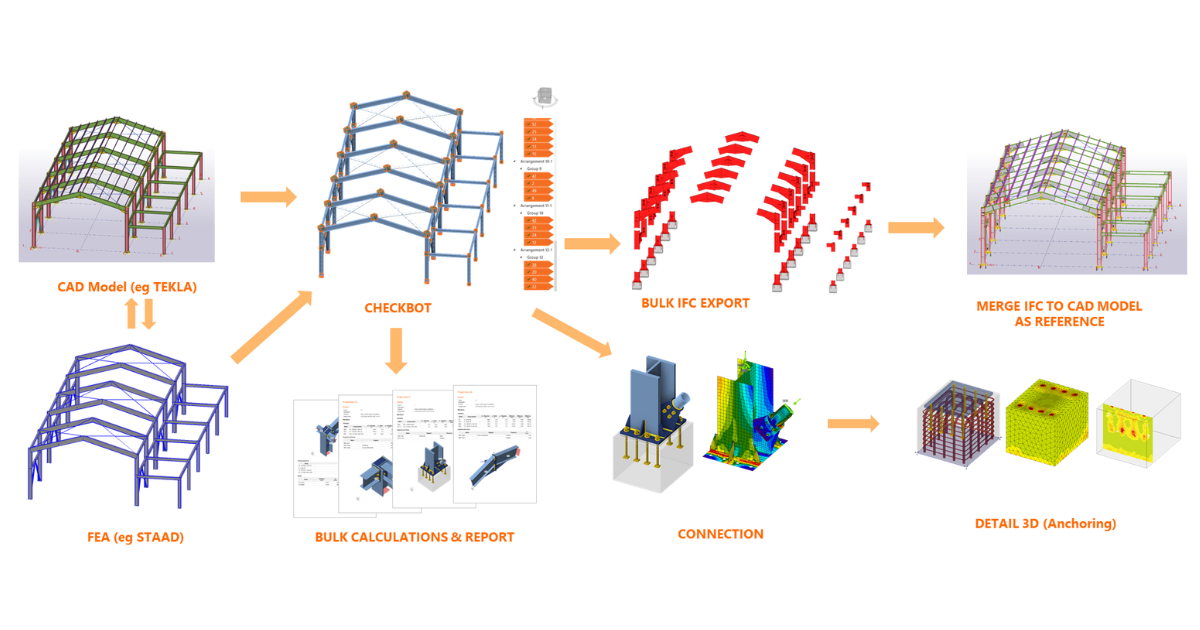
Cómo Checkbot puede simplificar su flujo de trabajo de diseño
Los desafíos a los que se enfrenta todo diseñador
Ha terminado su modelo estructural en STAAD.Pro, ETABS o Robot, y el siguiente paso es verificar sus uniones. Pero eso significa abrir otro programa, volver a introducir datos, hacer coincidir los casos de carga y construir el mismo modelo de nuevo. Un pequeño cambio en el modelo de análisis y todo el proceso se repite.
No es el análisis lo que le ralentiza, sino el ir y venir entre herramientas.
A continuación se presentan solo algunos de los desafíos o puntos de dolor que todo ingeniero estructural ha encontrado:
- Flujo de trabajo desconectado entre el análisis y el diseño de uniones hasta el detallado. La mayoría del software global de FEA solo gestiona el análisis de la estructura y el diseño de sus elementos. El diseño de las uniones no está integrado.
- Trabajo repetitivo en muchas uniones idénticas, lo que consume mucho tiempo. El enfoque más común para simplificar es elegir lo que se cree que es la más crítica entre las juntas, lo cual es muy arriesgado.
- Con numerosas combinaciones de carga a considerar, identificar manualmente la más crítica para cada junta es un desafío. El uso de envolventes puede llevar a un sobrediseño.
- Cambiar entre múltiples herramientas como el análisis global, hojas de cálculo de Excel y cálculos manuales rompe la concentración. La situación empeora si es necesario actualizar el diseño, ya que cada herramienta debe actualizarse manualmente para reflejar los últimos cambios.
- Preparar manualmente bocetos para delineantes de CAD o modeladores BIM para la generación de planos de construcción.
- Sobre todo, las limitaciones de tiempo debidas a plazos ajustados, que es el problema más común con el que deben lidiar los ingenieros, y la razón por la que se realiza una simplificación excesiva del diseño.
Para aprovechar los puntos tratados en esta entrada del blog y asegurarse de comenzar 2026 con fuerza, contacte ahora con su distribuidor local para obtener una oferta especial en el enlace a continuación.
Qué es Checkbot y cómo puede ayudar a todo ingeniero estructural
IDEA StatiCa Checkbot es una aplicación que actúa como centro neurálgico que conecta su software FEA analítico global (STAAD.Pro, ETABS, Robot, SAP2000, etc.) y software CAD (TEKLA Structures, Revit, etc.) con IDEA StatiCa Connection, Member, y Detail. Reúne todo en un solo lugar, donde puede ver, organizar y verificar sus juntas
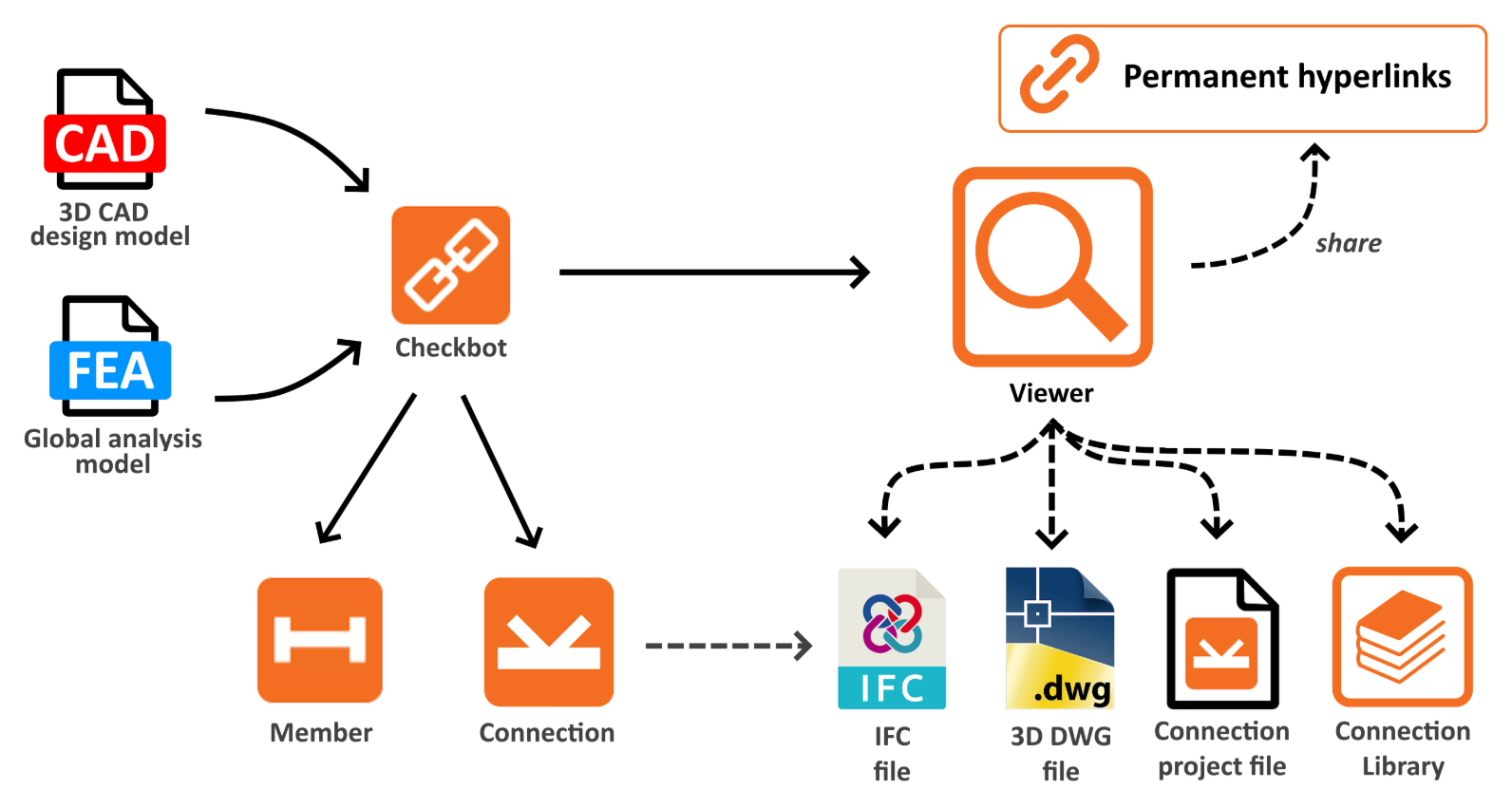
Actúa como su enlace BIM que unifica todo su flujo de trabajo de diseño bajo un mismo ecosistema.
- Checkbot se enlaza directamente con las principales herramientas de FEA (STAAD, SAP2000, ETABS, etc.) y CAD (Tekla, Revit, etc.), importando automáticamente la geometría de los elementos, las combinaciones de carga y las fuerzas internas, sin que se pierda ningún dato.
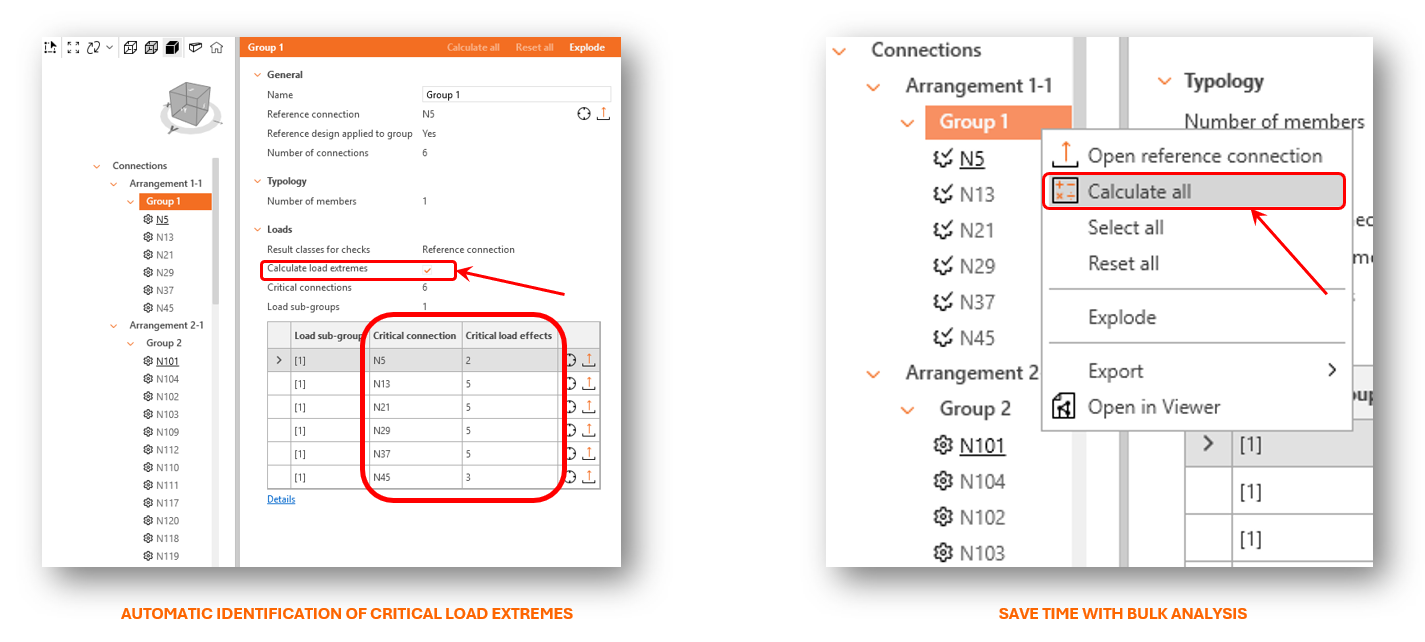
- Agrupación automática de juntas basada en tipología y geometría permite el análisis masivo, lo que permite a los ingenieros diseñar y verificar múltiples uniones simultáneamente.
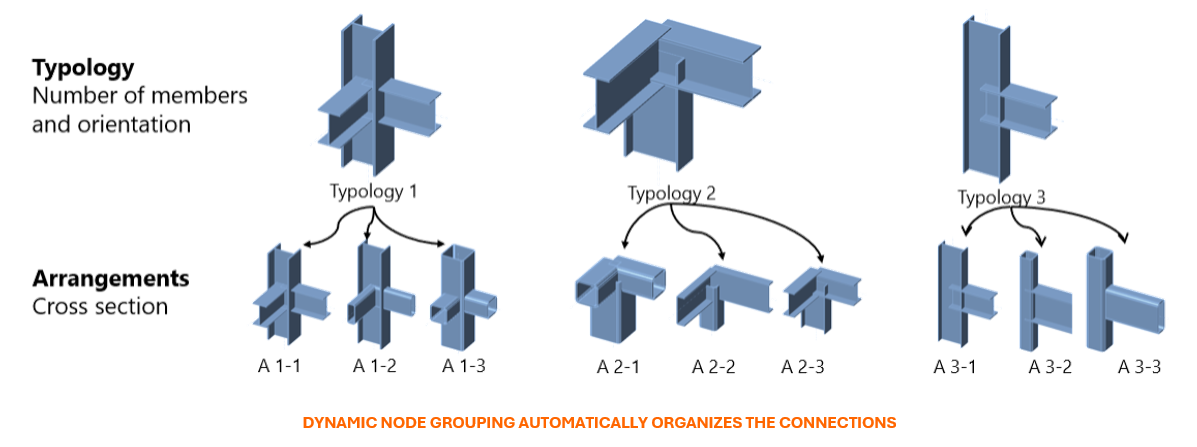
- Con la opción de activar Calcular Extremos de Carga, Checkbot identifica automáticamente los casos de carga determinantes para cada unión, lo que resulta en un análisis mucho más rápido.
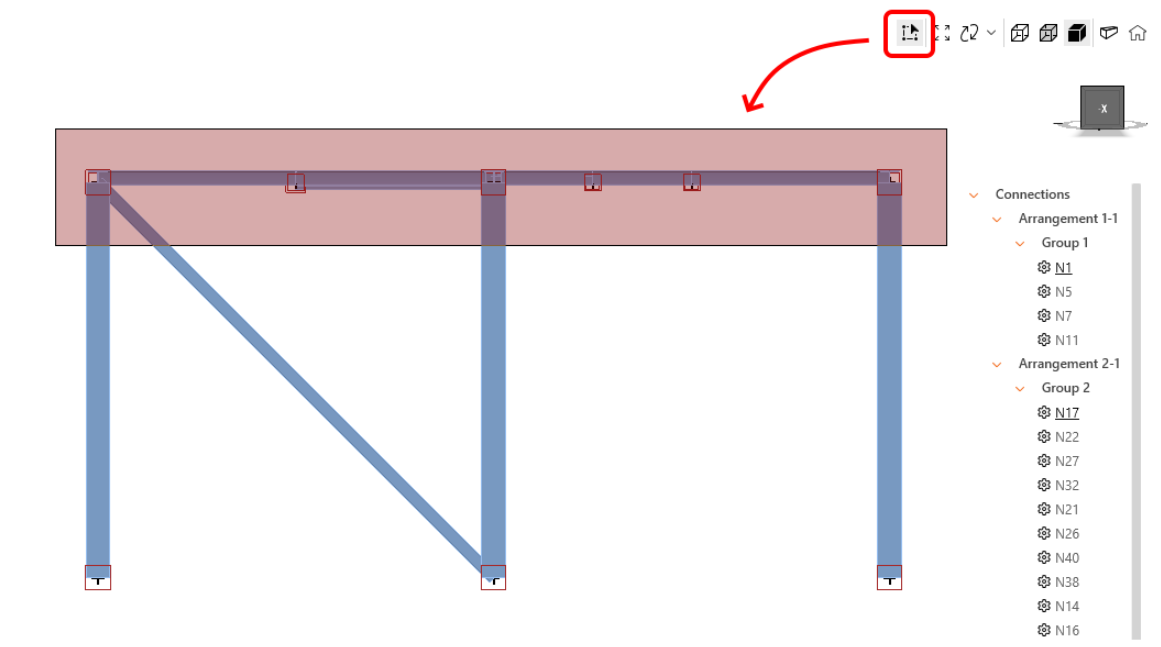
- Cuando es necesario realizar ajustes en la alineación de los elementos, en Checkbot se permite a los usuarios seleccionar, multiseleccionar o seleccionar por área para introducir eficazmente las excentricidades locales y globales y alinear los elementos para que coincidan con sus superficies en el modelo estructural importado.
- Al realizar un cálculo masivo, los usuarios pueden monitorizar el estado en la barra de progreso y no tienen que adivinar cuándo se completará el análisis. El botón cancelar termina el cálculo de la unión actual y de todas las uniones restantes en la cola.
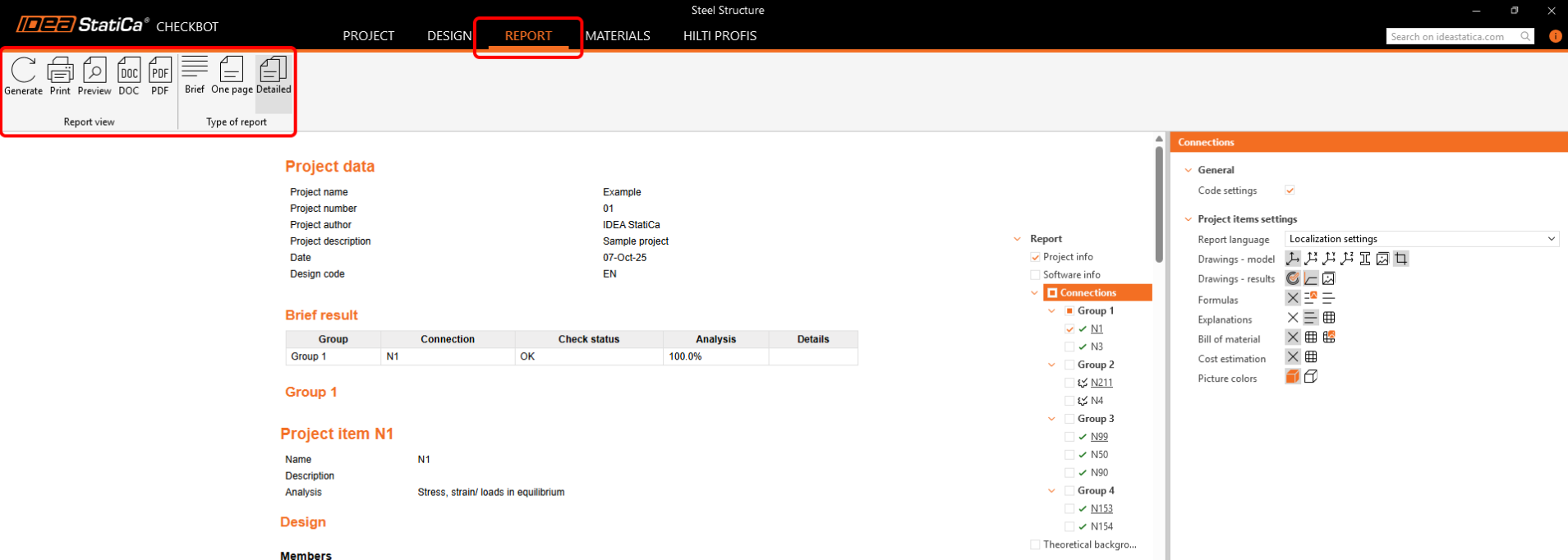
- En Checkbot, los usuarios pueden generar informes de forma masiva para todas las uniones del proyecto a la vez para las uniones seleccionadas, y pueden guardarse en formato PDF o DOC para su impresión o edición posterior.
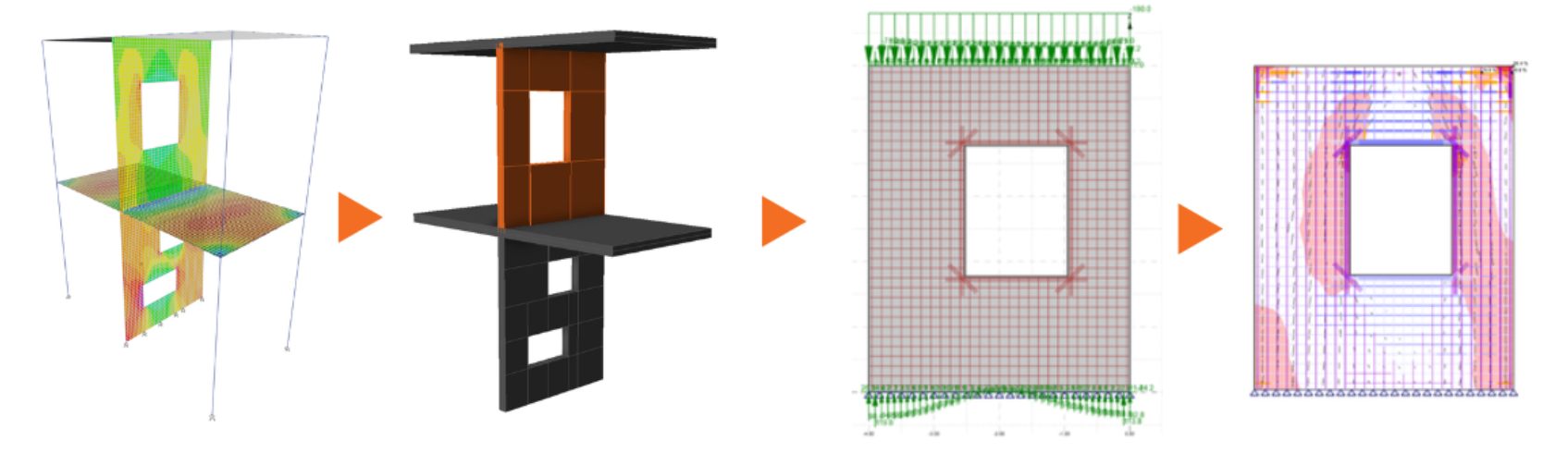
- Al diseñar muros, Checkbot también admite el enlace BIM que permite la transferencia del diseño de muros desde ETABS o SAP2000 a la aplicación Detail. Con esto, los ingenieros pueden realizar análisis no lineales avanzados y diseño directamente en Detail y ahorrar una cantidad significativa de tiempo al no tener que reconstruir manualmente el modelo del muro y reaplicar las cargas.
- Checkbot como centro de datos. Al sincronizar los modelos, garantiza que todas las actualizaciones se reflejen automáticamente, lo que resulta en un flujo de trabajo continuo y coherente sin necesidad de cambiar entre múltiples herramientas.
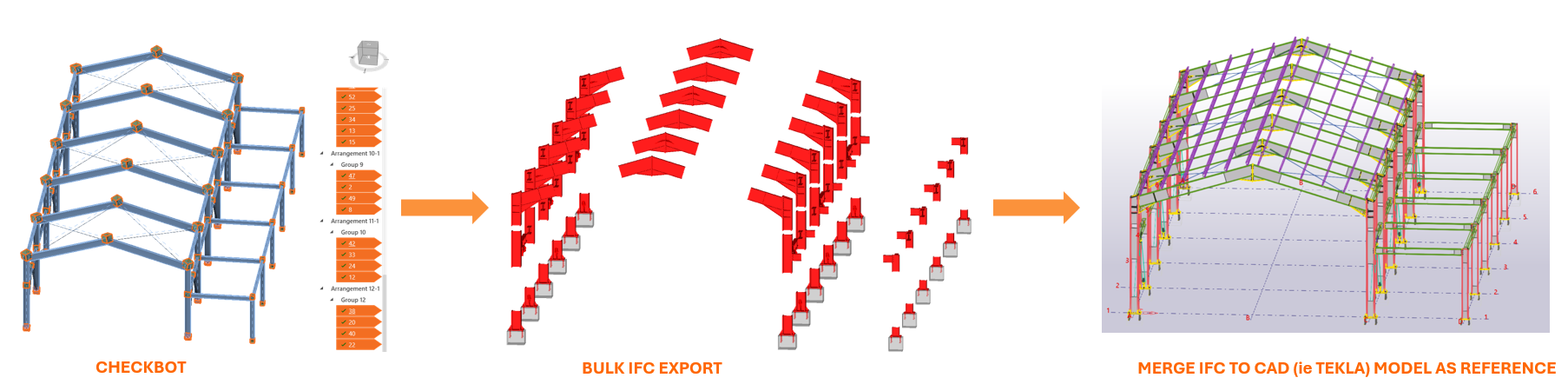
- Un modelo de unión 3D puede generarse y exportarse en formato DWG, DXF o IFC, que luego puede importarse a Tekla Structures o Revit como referencia. Esto elimina la necesidad de bocetos manuales.
Todo esto conduce en última instancia a un ahorro significativo de tiempo y a un menor esfuerzo en tareas repetitivas.
Lea este interesante artículo de mi colega Adam Kozousek sobre cómo diseñó su proyecto de nave de acero en una hora y también cómo Arris Engineering Services Pvt Ltd, una de nuestras empresas destacadas del mes, ahorró el 85% de su tiempo en su diseño. Mis colegas, Dominik Baric y Lukas Juricek, también realizaron un interesante seminario web con un caso de uso real sobre el diseño de uniones en una estructura de acero con forjado mixto.
Conclusión
IDEA StatiCa Checkbot es el eslabón perdido que transforma la forma en que los ingenieros entregan los resultados de su diseño. Ayuda a ahorrar tiempo valioso al mitigar el modelado repetitivo y las transferencias manuales de datos entre múltiples herramientas de diseño. Mantiene el análisis y el diseño de uniones en un proceso continuo, reduciendo las posibilidades de errores y retrabajos. Con todo organizado y vinculado como un centro de diseño, los ingenieros pueden centrarse más en tomar decisiones acertadas relativas a su diseño en lugar de gestionar múltiples herramientas y actualizaciones.
¡Obtenga su presupuesto ahora!
CONTENIDO RELACIONADO
Checkbot - flujos de trabajo BIM masivos
Flujos de trabajo masivos y filtro de carga crítica en Checkbot
Herramientas de gestión múltiple en Checkbot
HILTI PROFIS plugin en Checkbot